Library Batch Action beaTlet
A LibraryBatchAction is an action that processes each element in the library.
It is meant to be fairly quick, which is why it is not persisted. If, for example, you wanted
to change an attribute in the same way for each song, this would be the right way to do it.
To create your own LibraryBatchAction you need to subclass
com.tagtraum.beatunes.action.standard.LibraryBatchAction
and provide an implementation for the
LibraryBatchAction.EachSongProcessor
interface. A good way to do this
is to create an inner class in your main action class. To demonstrate how this is
done, check out the sample code for a PrintEachNameInLibrary-action. All it does, is
to write each song name in the library to the beaTunes log. As a nice side-effect, this also
shows you how to log stuff.
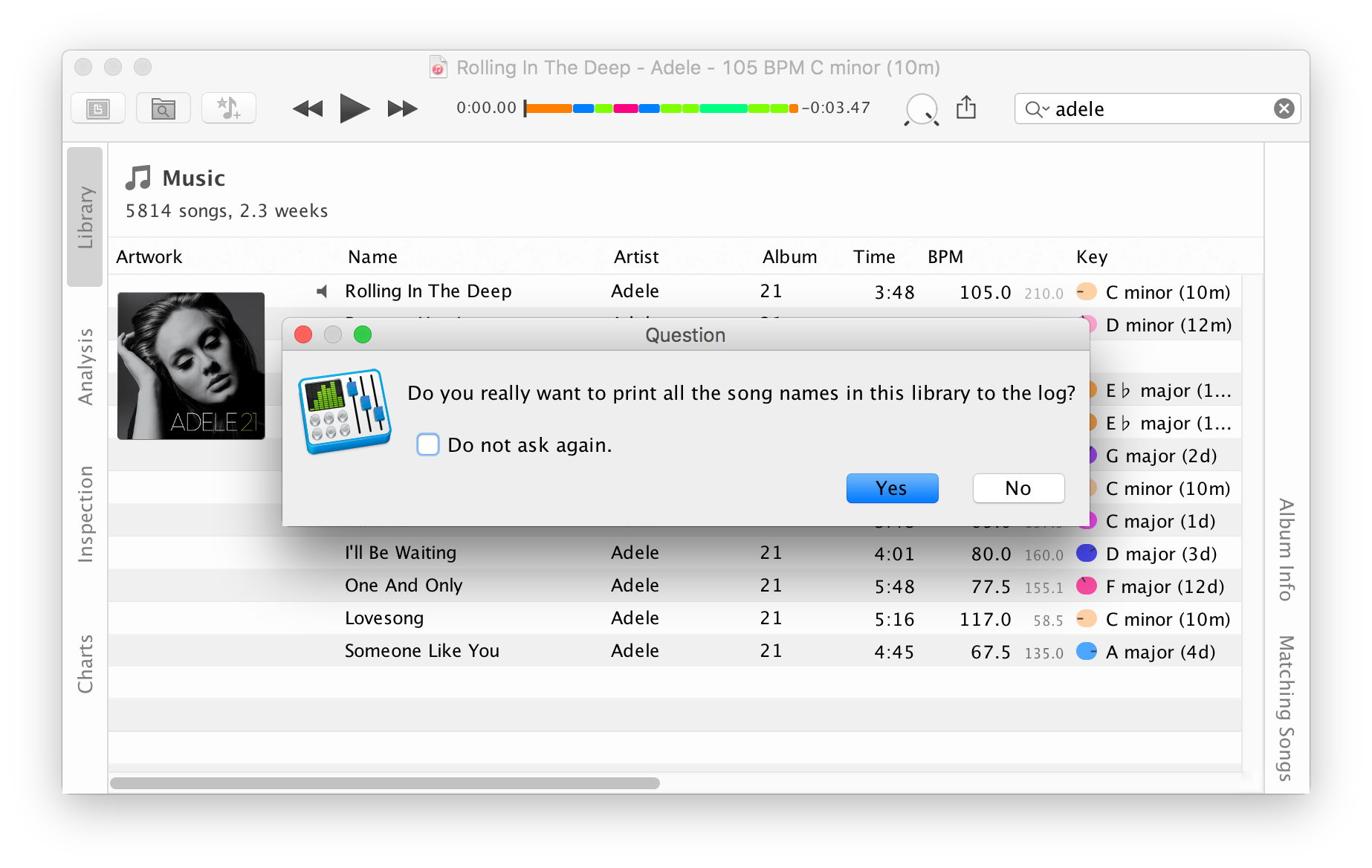
The code is pretty self-explanatory:
from javax.swing import Action
from org.slf4j import LoggerFactory
from com.tagtraum.beatunes.action.standard import LibraryBatchAction

# An action that allows to do something (print the name) for each song in the library.
# The corresponding menu item can be found in the 'Tools' menu.
class PrintEachNameInLibrary(LibraryBatchAction):

    # Inner class that implements the
    # com.tagtraum.beatunes.action.standard.LibraryBatchAction.EachSongProcessor
    # interface. Its process method is called for each song.
    class SongPrinter(LibraryBatchAction.EachSongProcessor):

        log = LoggerFactory.getLogger("PrintEachNameInLibrary.py")

        # Called once, before processing starts.
        def startProcessing(self, count):
            self.__class__.log.info("We are expecting to print %s names. Let's start!" % (count))

        # Called for each song.
        def process(self, song, index):
            # print to beaTunes log file
            self.__class__.log.info("Song: %s" % (song.getName()))

        # Called once all songs were processed.
        def finishProcessing(self):
            self.__class__.log.info("Done!")

        # Message to be shown in progress dialog.
        def getProgressDialogMessage(self, song):
            return "<html>Printing <i>%s</i> ...</html>" % (song.getName())

        # Title for progress dialog.
        def getProgressDialogTitle(self):
            return "Printing Song Names ..."

    # Unique id
    def getId(self):
        return "Jython.PrintEachNameInLibrary"

    # Is called by beaTunes as part of the lifecycle after instantiation.
    # At this point all other plugins are instantiated and registered.
    # We use this to set the menu item's (i.e. action's) name.
    def init(self):
        self.putValue(Action.NAME, "Print all Song Names")

    # We need to ask the user, whether he really wants to do this.
    # How we ask is defined here.
    def getConfirmationMessage(self):
        return "Do you really want to print all the song names in this library to the log?";

    # Factory method that creates the processor for each song.
    def createEachSongProcessor(self):
        return PrintEachNameInLibrary.SongPrinter();
import javax.swing.Action
import org.slf4j.LoggerFactory
import com.tagtraum.beatunes.action.standard.LibraryBatchAction
import com.tagtraum.beatunes.action.standard.LibraryBatchAction.EachSongProcessor
import com.tagtraum.audiokern.AudioSong

// An action that allows to do something (print the name) for each song in the library.
// The corresponding menu item can be found in the 'Tools' menu.
class PrintEachNameInLibrary extends LibraryBatchAction {

    // Inner class that implements the
    // com.tagtraum.beatunes.action.standard.LibraryBatchAction.EachSongProcessor
    // interface. Its process method is called for each song.
    class SongPrinter implements EachSongProcessor {

        static log = LoggerFactory.getLogger("PrintEachNameInLibrary.groovy")

        // Called once, before processing starts.
        def void startProcessing(int count) {
            log.info "We are expecting to print ${count} names. Let's start!"
        }

        // Called for each song.
        def void process(AudioSong song, int index) {
            // print to beaTunes log file
            log.info "Song: ${song.getName()}"
        }

        // Called once all songs were processed.
        def void finishProcessing() {
            log.info "Done!"
        }

        // Message to be shown in progress dialog.
        def String getProgressDialogMessage(AudioSong song) {
            "<html>Printing <i>${song.getName()}</i> ...</html>"
        }

        // Title for progress dialog.
        def String getProgressDialogTitle() {
            "Printing Song Names ..."
        }
    }

    // Unique id
    def String getId() {
        "Groovy.PrintEachNameInLibrary"
    }

    // Is called by beaTunes as part of the lifecycle after instantiation.
    // At this point all other plugins are instantiated and registered.
    // We use this to set the menu item's (i.e. action's) name.
    def void init() {
        putValue(Action.NAME, "Print all Song Names")
    }

    // We need to ask the user, whether he really wants to do this.
    // How we ask is defined here.
    def String getConfirmationMessage() {
        "Do you really want to print all the song names in this library to the log?"
    }

    // Factory method that creates the processor for each song.
    def EachSongProcessor createEachSongProcessor() {
        new SongPrinter()
    }
}
require 'java'

java_import javax.swing.Action
java_import org.slf4j.LoggerFactory
java_import com.tagtraum.beatunes.action.standard.LibraryBatchAction

# An action that allows to do something (print the name) for each song in the library.
# The corresponding menu item can be found in the 'Tools' menu.
class PrintEachNameInLibrary < LibraryBatchAction

    # Inner class that implements the
    # com.tagtraum.beatunes.action.standard.LibraryBatchAction.EachSongProcessor
    # interface. Its process method is called for each song.
    class SongPrinter
        # include is the JRuby way of implementing interfaces
        include Java::com.tagtraum.beatunes.action.standard.LibraryBatchAction::EachSongProcessor

        @@log = LoggerFactory.getLogger("PrintEachNameInLibrary.rb")

        # Called once, before processing starts.
        def startProcessing(count)
            @@log.info "We are expecting to print #{count} names. Let's start!"
        end

        # Called for each song.
        def process(song, index)
            # print to beaTunes log file
            @@log.info "Song: #{song.getName}"
        end

        # Called once all songs were processed.
        def finishProcessing
            @@log.info "Done!"
        end

        # Message to be shown in progress dialog.
        def getProgressDialogMessage(song)
            "<html>Printing <i>#{song.getName}</i> ...</html>"
        end

        # Title for progress dialog.
        def getProgressDialogTitle
            "Printing Song Names ..."
        end

    end

    # Unique id
    def getId
        "JRuby.PrintEachNameInLibrary"
    end

    # Is called by beaTunes as part of the lifecycle after instantiation.
    # At this point all other plugins are instantiated and registered.
    # We use this to set the menu item's (i.e. action's) name.
    def init
        putValue(Action::NAME, "Print all Song Names")
    end

    # We need to ask the user, whether he really wants to do this.
    # How we ask is defined here.
    def getConfirmationMessage
        "Do you really want to print all the song names in this library to the log?";
    end

    # Factory method that creates the processor for each song.
    def createEachSongProcessor
        SongPrinter.new;
    end

end
                        /*
 * These type vars basically act as imports for Java classes.
 */
var Action = Java.type("javax.swing.Action");
var LoggerFactory = Java.type("org.slf4j.LoggerFactory");
var LibraryBatchAction = Java.type("com.tagtraum.beatunes.action.standard.LibraryBatchAction");
var EachSongProcessor = Java.type("com.tagtraum.beatunes.action.standard.LibraryBatchAction.EachSongProcessor");
var AudioSong = Java.type("com.tagtraum.audiokern.AudioSong");

var beatlet = new LibraryBatchAction() {

    /*
     * Factory method that creates the EachSongProcessor.
     */
    createEachSongProcessor: function() {

        // Inner class that implements the
        // com.tagtraum.beatunes.action.standard.LibraryBatchAction.EachSongProcessor
        // interface. Its process method is called for each song.
        return new EachSongProcessor() {

            log: LoggerFactory.getLogger("PrintEachNameInLibrary.js"),

            /* Called once, before processing starts. */
            startProcessing: function(count) {
                this.log.info("We are expecting to print " + count + " names. Let's start!");
            },

            /* Called for each song. */
            process: function(song, index) {
                // print to beaTunes log file
                this.log.info("Song: " + song.getName());
            },

            /* Called once all songs were processed. */
            finishProcessing: function() {
                this.log.info("Done!");
            },

            /* Message to be shown in progress dialog. */
            getProgressDialogMessage: function(song) {
                return "

                            Printing "+ song.getName() + " ...

                        ";
            },

            /* Title for progress dialog. */
            getProgressDialogTitle: function() {
                return "Printing Song Names ...";
            }
        }
    },

    // Unique id
    getId: function() {
        return "Javascript.PrintEachNameInLibrary"
    },

    /*
     * Is called by beaTunes as part of the lifecycle after instantiation.
     * At this point all other plugins are instantiated and registered.
     * We use this to set the menu item's (i.e. action's) name.
     */
    init: function() {
        beatletSuper.putValue(Action.NAME, "Print all Song Names");
    },

    /*
     * We need to ask the user, whether he really wants to do this.
     * How we ask is defined here.
     */
    getConfirmationMessage: function() {
        return "Do you really want to print all the song names in this library to the log?";
    }
}

// Find super class of beatlet, so that we can call methods on it
// e.g. in the "init" function.
var beatletSuper = Java.super(beatlet);

// Put "beatlet" into the last line, so that it is returned to beaTunes
// when this script is eval'd.
beatlet;
Curious to see more examples? Check out the playlist exporter sample code.
Other beaTlet samples:
- Getting Started
- Context Action
- Playlist Exporter
- Song Analysis Task
- beaTlet Plugin Descriptor
- Song Context View
- Song Property Analyzer
- Key Text Renderer
All sample beaTlets are also on
GitHub
 .
.